
InkSpill is a simple JavaScript game that will run in any modern web browser.
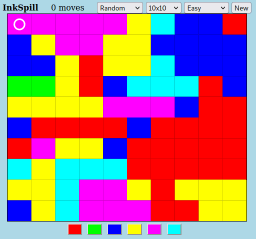
The goal is to convert the entire board to a single color by “spilling” ink into the circle in the upper left corner using the fewest moves. The newly spilled ink will “flow” over all of the squares which are the same color as the color in the circle. For example, the picture above shows a game where the current “circle color” is pink. So clicking any of the color buttons (along the bottom) will change all of that pink region into another color. In this example, clicking the blue button would turn all of the pink region into blue which would then match the blue region below it. Here’s how that will look after clicking the blue button:

You can see that the previously pink area is now blue. You can also see that the number of moves has gone from 0 to 1. The game progresses by picking new colors again and again until the entire board is one color. In this particular example, the next color to select might be yellow since there are a number of large yellow regions bordering the new blue region connected to the circle. The goal is to make the board all one color in as few moves as possible.
The InkSpill program has a number of controls to specify various aspects of the game including size, and difficulty. The pictures show a Random 10×10 Easy game which is a good way to start.
This JavaScript version of InkSpill was inspired by the Python version that has been included with the Raspberry Pi Operating System for a number of years.
You can download the game below. It will be a “ZIP” file which can be unpacked with most operating systems. The unpacked file will be named InkSpill.htm. If you double click on that file it should open InkSpill in your web browser.
 Magnolia Mobile News