
Two free and open source video editors (KDENLive and OpenShot) were demonstrated at the October 21, 2021 club meeting. A complete project was built in each of the two editors to show the similarities and differences between them.
Both editors share similar major subwindows:
- Media files subwindow for holding original video, audio, and still images
- Effects subwindow(s) for adding and modifying special effects
- Preview subwindow for viewing the project as it is being built
- Time line subwindow for placing and viewing video, audio, and still images
This first snapshot shows the project we built in KDENLive:

The original media files were imported (dragged and dropped) into the “Project Bin” on the left. These media files were then dragged and dropped into the time line (bottom) where they were trimmed and arranged. The upper right preview window shows the current location in the time line or a preview of the video when playing.
This second snapshot shows the same project being built in OpenShot:
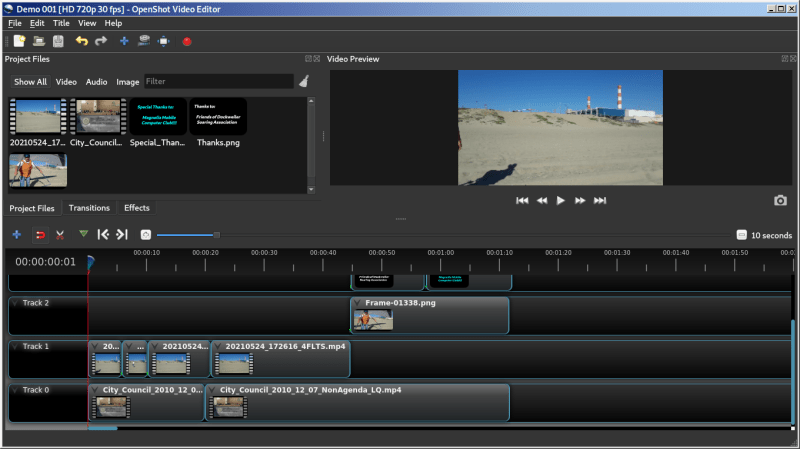
The arrangement of windows is almost identical with media files imported into the “Project Files” on the left. The time line (at the bottom) looks slightly different but is functionally very similar to the KDENLive time line. The same is true of the preview window in the upper right.
Both of these video editors are fun and easy to use. While today’s class was just a demonstration, hopefully future classes will provide hands-on experience.
 Magnolia Mobile News