
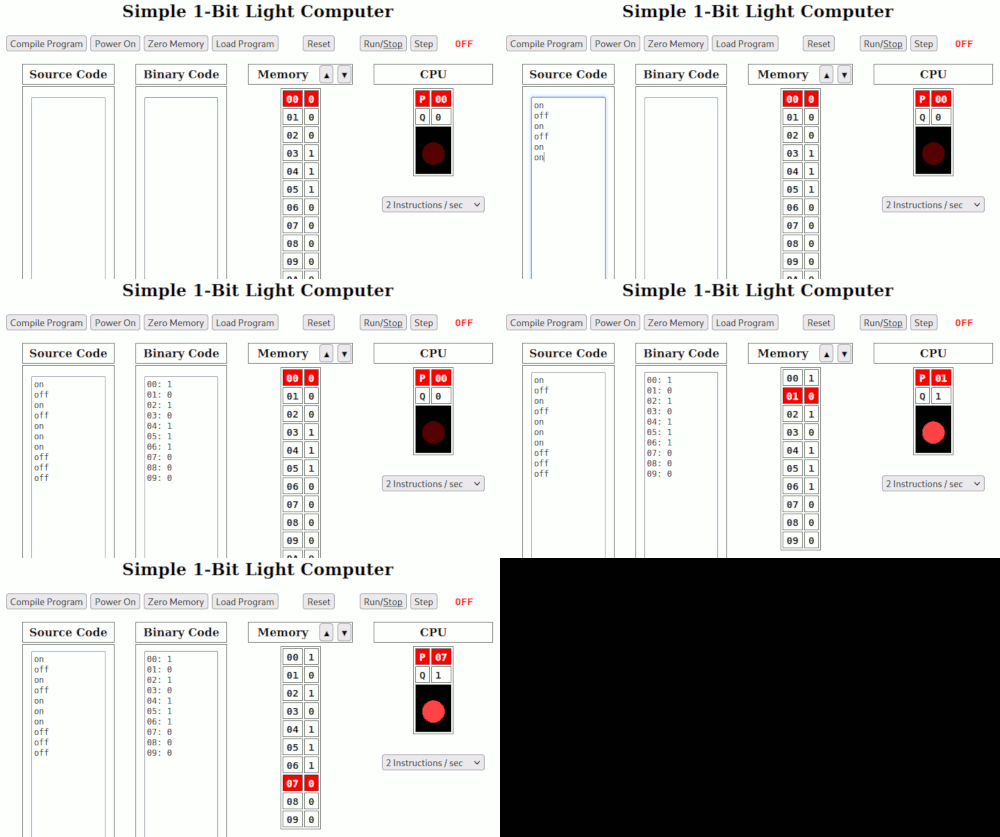
This is a simple 1-bit (0,1) computer with the ability to understand a very simple computer language: “on” and “off”. This computer only understands those 2 instructions: on and off. If the next instruction is “on“, then it will turn the light on. If the next instruction is “off“, then it will turn the light off. This computer is so simple that it’s easy to write programs in binary with 1‘s and 0‘s. But it also supports writing and compiling “source code” made up of “on” and “off” instructions. The source code is written in the “Source Code” block. The “Compile Program” button will translate it into binary instructions into the “Binary Code” block. From there it can be easily loaded into memory (with the “Load Program” button) and run (with the “Run/Stop” button) just as if it had been originally written in binary.
You can run this program using this link: One Bit Binary Computer with Source
You can also download this simple simulation below. It will be a “ZIP” file which can be unpacked with most operating systems. The unpacked file will be named Simple_1Bit_Light.html. If you double click on that file it should open the simulation in your web browser.
To run the simulation, enter a short program in the “Source Code” box on the left. Try the pattern “off on off on on on off off” which will give a short blink followed by a longer blink. After you type in the program, click the “Compile Program” button to turn your “on” and “off” instructions into the “1” and “0” instructions that the computer can execute. Then click the “Load Program” button to copy the program into Memory. Then click the “Run/Stop” button to make the computer actually run the program from Memory. You can speed it up by changing the number of instructions per second using the selection button below the blinking light.
Play with it. It’s all software, so you can’t hurt anything!
 Magnolia Mobile News